

Building AI Agents with Prime RL: From Environment Design to RL Training
Training AI agents to reason, use tools, and solve complex tasks requires more than a good model — it requires a structured evaluation and training loop. Prime RL, built on top of the Verifiers framework, provides exactly that: a production-grade system for defining custom agent environments, evaluating model behavior at scale, and running reinforcement learning to improve agent capabilities.
What is Prime RL and Verifiers?
Verifiers is a Python library for building rollout environments — self-contained task definitions that a language model interacts with and is scored on. Each environment exposes a load_environment() function returning a vf.Environment that bundles a dataset, a rubric (scoring logic), and an interaction protocol. Prime RL wraps this with a CLI and hosted infrastructure that manages the full lifecycle from local development to large-scale evaluation sweeps and RL training.
The core CLI commands are:
prime env init— scaffold a new environment package underenvironments/prime env install— install locally withuv pip install -efor developmentprime eval run— evaluate any model against the environment, auto-saving results to the Evaluations tabprime env push— publish to the Environments Hub for hosted training or sharingprime-rl— run reinforcement learning training loops against the environment
The Environment Lifecycle
Every environment follows the same four-step golden path: init → install → eval → push. This is the contract that makes environments composable across the entire Prime ecosystem.
The workspace is initialized once with prime lab setup, which creates environments/ for all environment packages, configs/ for endpoint aliases and eval TOML configs, and data/ for datasets and synthetic data.
Choosing the Right Environment Base Class
Verifiers provides a hierarchy of environment base classes. Picking the smallest correct one keeps the implementation simple and inherits the right behavior automatically:
- SingleTurnEnv — The simplest case: one model response, one reward. Ideal for QA, classification, or generation tasks where a single pass is sufficient.
- MultiTurnEnv — Abstract base for any custom interaction loop. Override
env_response()to define how the environment reacts after each model turn — useful for games, simulations, or custom agent protocols. - ToolEnv — Extends MultiTurnEnv with OpenAI-compatible tool calling. Pass async Python functions as tools; Verifiers auto-extracts schemas from type hints and docstrings. Best for stateless tool use.
- MCPEnv — Extends ToolEnv to connect to external MCP (Model Context Protocol) servers. Tools from the MCP server appear automatically in the model context.
- StatefulToolEnv — For tools that need per-rollout state: database sessions, sandbox handles, API tokens. Override
setup_state()andupdate_tool_args()to inject state invisibly from the model perspective. - SandboxEnv / PythonEnv — Batteries-included environments for containerized bash shells and persistent Python REPLs via Prime Sandboxes. Lifecycle management is fully automatic.
Rubrics: The Scoring Engine
A vf.Rubric holds one or more reward functions, assigns weights to each, and computes the final scalar reward for each rollout. Reward functions are plain async Python functions that receive rollout data by argument name:
The standard arguments available to reward functions are: completion (model output messages), prompt (input messages), answer (ground-truth string), info (structured metadata dict), and state (mutable rollout state shared across all reward functions — pass derived values between functions without re-computation).
For tasks requiring LLM-based grading, vf.JudgeRubric provides a judge() callable inside reward functions. For mathematical correctness, vf.MathRubric handles boxed-answer parsing and symbolic verification via math-verify. Multiple rubrics can be composed with vf.RubricGroup for multi-domain scoring.
A Real Example: The Fitness Meal Planner Environment
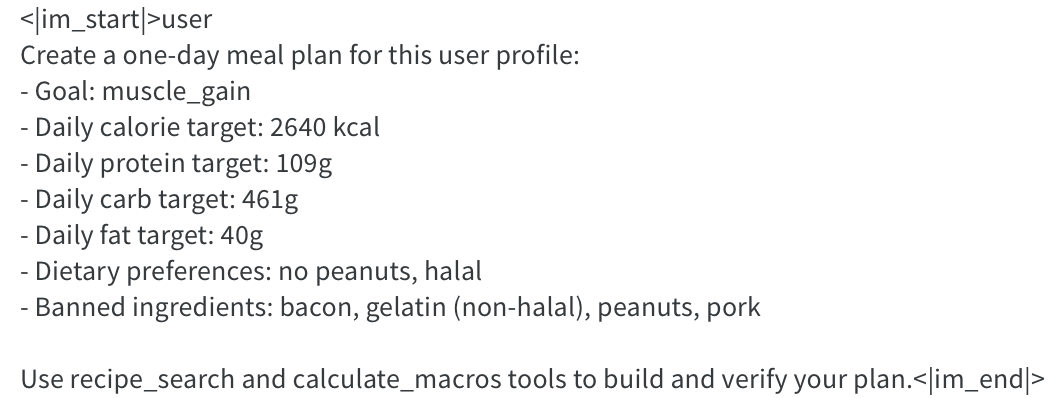
To make this concrete, I built a Fitness Meal Planner environment as part of my Prime RL lab workspace — directly connected to the domain powering SyntraFit. The task: given a user profile with calorie and macro targets, dietary preferences, and banned ingredients, the model must use tools to compose a valid one-day meal plan that hits all targets within ±5%.
The environment is a ToolEnv with two tools:
- recipe_search(query, dietary_tags) — keyword and tag search over a local recipe database, returning matching recipes with full macro profiles (calories, protein, carbs, fat).
- calculate_macros(meals_json) — verifies the total macros of a proposed meal plan, with robust handling for double-encoded JSON that models sometimes produce.
The rubric has five reward functions with carefully tuned weights:
- schema_reward (weight 0.0) — gate check: is the final output valid JSON with the correct meal plan shape? Zero weight keeps it as a tracked metric without affecting the training signal.
- macro_reward (weight 0.40) — continuous reward based on mean absolute percentage error across calories, protein, carbs, and fat. This is the core signal.
- variety_reward (weight 0.15) — rewards using at least 3 distinct meals. Prevents degenerate single-meal plans that technically hit macros.
- banned_keyword_reward (weight 0.15) — penalizes meals containing banned ingredients, checking both meal names and recipe ingredient lists from the database.
- recipe_fidelity_reward (weight 0.30) — checks that final meal names match recipes that actually appeared in tool call results. Prevents hallucinated recipe names.
A key design decision: the dataset falls back to synthetic generation when no external file is available. The environment synthesizes 400 training and 120 eval scenarios from random combinations of calorie targets, macro splits, dietary preferences, and banned ingredient lists. This makes it fully self-contained and immediately trainable after install — no external data pipeline required.
Running Evaluations with prime eval run
prime eval run is the canonical eval path. It handles environment loading, rollout execution, result storage, and reporting — no extra scripting needed. Results are saved automatically and browsable via the private Evaluations tab or locally with prime eval tui:
For multi-model comparisons and ablation sweeps, TOML config files are the preferred approach — they make runs reproducible and keep parameters version-controlled:
Endpoint aliases in configs/endpoints.toml let you switch models by short ID instead of repeating base URLs and API keys on every command:
RL Training with prime-rl
Once an environment evaluates reliably and shows reward diversity at baseline — the model does not consistently score near 0 or near 1 — it is ready for RL training. Push to the Hub first, then configure a training run:
Key hyperparameters to set correctly:
- rollouts_per_example — rollouts generated per dataset example per step. Start at 8 for simple environments, 16 for complex multi-turn tasks. Groups are used for GRPO-style advantage computation.
- batch_size — total rollout samples per gradient step. Must be divisible by
rollouts_per_example. Common starting points: 128 for simple tasks, 512 for complex ones. - online_difficulty_filtering — filters trivially easy or hard examples using rolling reward thresholds. Enable for binary rewards; use conservatively for continuous rewards like macro accuracy.
- oversampling_factor — generate more rollouts than needed and keep the most informative. Values of 2.0–3.0 improve sample efficiency for binary-reward tasks.
Quality Rules That Matter in Practice
After building and iterating through the fitness meal planner environment, these rules proved most important in practice:
- Deterministic or LLM-judge rewards only. Keyword heuristics create reward hacking surfaces that corrupt training signals. Use exact structural checks or judge models with clear rubrics.
- Self-contained after install. Never require users to start background services before
load_environment(). Manage all external resources inside the environment lifecycle usingsetup_state()and cleanup decorators. - Validate API keys early. Call
vf.ensure_keys(["OPENAI_API_KEY"])at the top ofload_environment(). Fail loudly and early rather than silently mid-rollout. - Confirm reward diversity before training. Run a baseline eval first. If rewards cluster near 0 or 1, fix task difficulty before starting RL — reward diversity is a prerequisite for meaningful GRPO advantage computation.
- Publish before scaling. Push to the Hub after smoke tests pass, then run large evals and training against the Hub slug for full reproducibility and auditability.
Train Results
Below, you can see how the agent improved its score after 22 hours (appr. ) of training. More specifically, agent reached the eval score of 0.87. This score outperforms agents with llm backbones of proprietary modesl such as Openai GPT-4o etc.
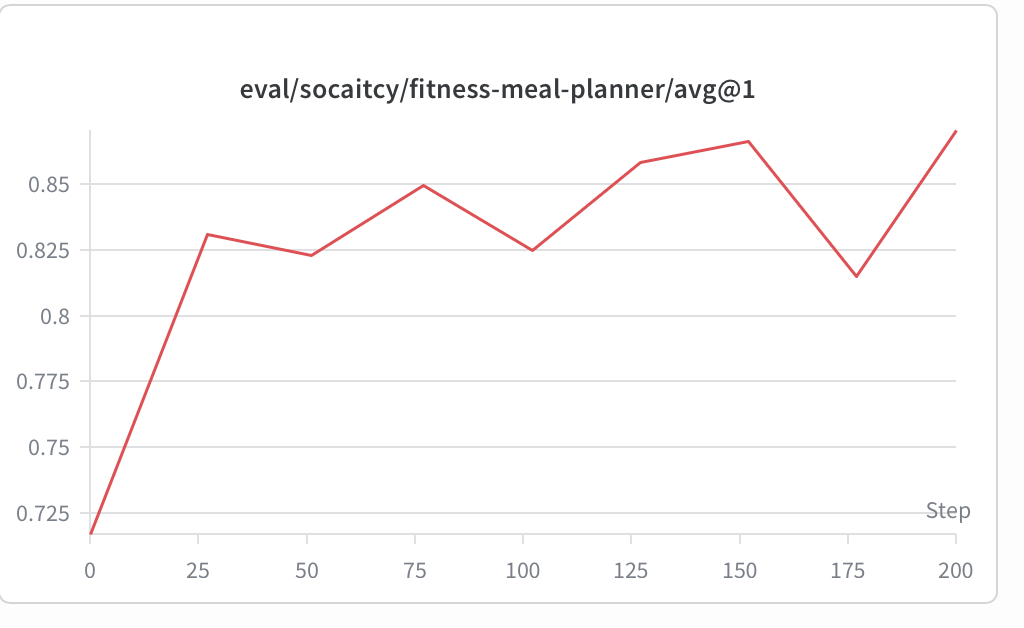
But as we saw on a previous article ( https://www.ipastellas.com/articles/finetuning-langgraph-agents-with-rl ) , qualitatively results are not enough as they cannot show reward hacking issues. Below there is a specific scenario and the plan produced by the agent. We can see that this time agent produces quality results and we can verify the enviroment design was better than the previous time.

Why This Workflow Changes Agent Development
The Prime RL and Verifiers ecosystem solves the gap between an agent that works in a demo and an agent you can systematically measure and improve. By routing every task through the same load_environment() → vf.Environment contract, every environment automatically gets:
- Automatic result saving and versioning via
prime eval run— no custom logging code required - Built-in execution metrics:
num_turns,total_tool_calls, per-tool call counts — tracked without any extra instrumentation - Group-based advantage computation for GRPO-style RL training, ready to use out of the box
- Hub publishing and environment sharing with a single CLI command
- GEPA prompt search without writing a custom optimization loop
The fitness meal planner environment went from concept to a passing smoke eval in about two hours — most of that time spent designing the reward functions and thinking about what a good meal plan actually looks like, not wrestling with infrastructure. That is the core value of Prime RL: it abstracts the training machinery so you can focus entirely on the task itself. After all, as models and the training infrastructures are getting better and more automated, what is matters will be what task/ problem you define and optimize for these systems.